
LinkedIn lead generation is the practice of turning professional visibility and direct conversation on LinkedIn into commercial enquiries: a profile that explains what problem you solve, content that proves it, outreach that starts a conversation instead of pitching, and paid formats that capture a contact without leaving the platform. For B2B companies it is the channel through which B2B lead generation reaches decision-makers directly. This guide covers all four routes, how to optimize a LinkedIn profile, how Lead Gen Forms work and what they cost you, what Sales Navigator adds, and which metrics prove any of it worked.
Is LinkedIn good for B2B lead generation?
Yes, for one structural reason: it is the only large platform where people are present in a professional capacity, with their job title, employer and seniority visible and kept current by the users themselves. That makes targeting by role possible in a way no other social platform supports, and it makes contact between strangers socially acceptable — provided the contact carries something worth reading.
The qualification matters more than the endorsement. LinkedIn is a slow channel with a long run-up, and it rewards consistency over intensity. Relationships and authority built there survive the end of a budget, which is the opposite of how paid channels behave, but they also take months rather than weeks to produce the first enquiry. The practical conclusion from the lab's own testing: LinkedIn works best running alongside fast channels, not as a substitute for them.
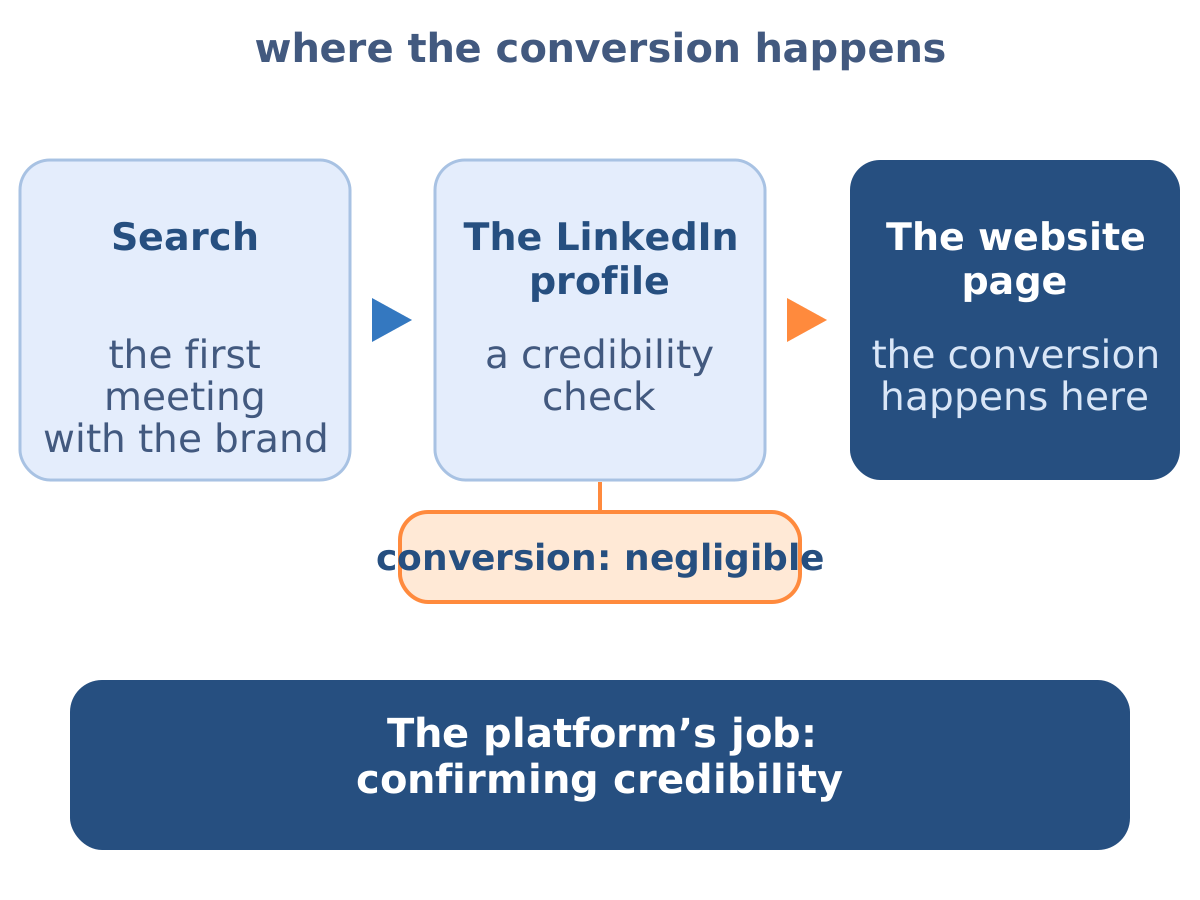
One expectation is worth correcting at the start, because it shapes how the channel gets measured. Directional, from the drySEO lab's practice rather than from measurement: social platforms generate interactions roughly twice as numerous as the site's own users, with effectively no conversion happening on the platform itself (drySEO lab data). That is not a failure of social — it is what social is for. Someone who already met the brand in search comes to LinkedIn looking for confirmation, and then converts on a landing page. Treated as a stop in the journey, the channel performs; treated as a place where deals close, it will always disappoint.
Where does social sit on the path in B2B?
The answer comes from two separate things: a measurement of how people first reach the site, and an observation of what happens to the people who already know it. They are produced differently, so they are set out separately.
Measured. In site analytics, the first channel a user arrives through breaks down as organic search 68.2%, direct 22.2%, paid search 4.9%, display 1.3% (drySEO lab data, measured, from site analytics; denominator: users by first-touch channel). Social does not reach the top of that table — a reading taken off a system, rather than an opinion about the channel.
From practice. The observation above describes the same thing from the other end: interactions on social run at roughly twice the number of site users while conversion on the platform itself stays negligible (drySEO lab data, directional from practice, an order-of-magnitude reading). Together the two describe one mechanism. People arrive at a profile having met the brand elsewhere — usually in search — and they come looking for evidence that there is a competent human on the other side. They find it, and they convert back on the site.
The consequence for reporting is direct. A social selling programme judged by leads produced on the platform will look poor every month, because it is being priced as demand generation while its actual job is to confirm credibility and keep the contact alive inside the decision window.
Measuring the decision window. That window is long. Measured on the lab's last thousand leads, cumulatively: 7.07% of closings came within 3 days, 41.65% within 45 days and 65.96% within 75 days (drySEO lab data — closings ÷ time since the lead's entry; a share of closings, not of leads). Fewer than half of all closings have happened by day 45, and a third of them arrive after day 75. Across those months somebody has to stay present — and that is what the profile is for.
How can lead generation be done through LinkedIn?
Four routes, which use the same audience definition and almost nothing else in common:
Inbound through profile and content
You publish, people read, some of them look at your profile, and a share of those start a conversation. Slow, cheap, and the only route that compounds.
Outreach through connection requests and messages
You select accounts, observe, and open a conversation with context. Fast, controllable, and destroyed by templating.
Paid advertising with Lead Gen Forms
You pay for reach to a precisely defined audience and capture the contact inside LinkedIn, with fields pre-filled from the member's profile.
Prospecting with Sales Navigator
A paid layer over the first two that adds filters, lists and buying signals.
Which route to start with follows from the audience definition rather than from preference — the same definition that drives every other channel, set out in B2B Target Audience. Narrow, senior, high-value audiences reward outreach and content; broader technical audiences with a shorter cycle reward paid forms.
How do you optimize a LinkedIn profile for lead generation?
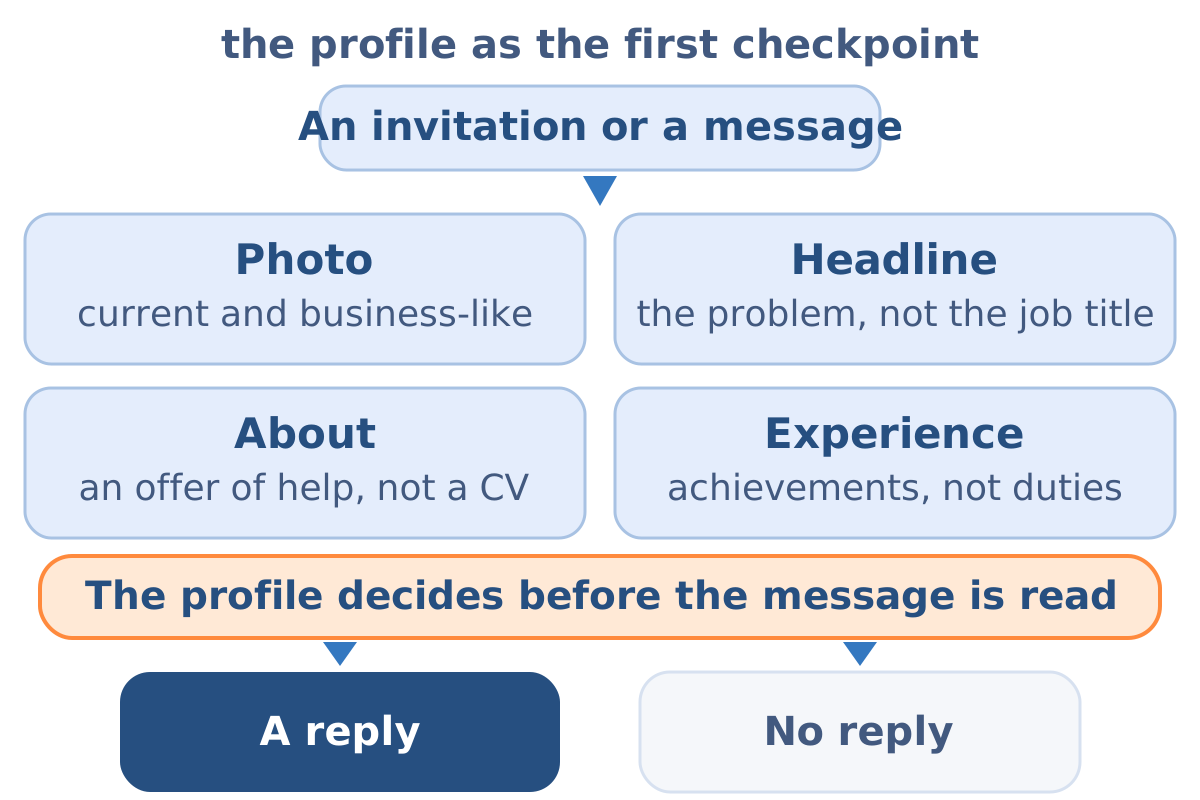
By writing it for the person you want to hear from, rather than as a career record. The profile is the first checkpoint: before anyone replies to an invitation or a message, they look at who is writing. Four elements do the work:
- A professional photo. Current, business-appropriate. A profile without a face starts every conversation at a disadvantage.
- A headline stating the problem you solve, not your job title. “I help manufacturing companies win customers from Google” tells a prospect something; “Marketing Specialist” tells them nothing they can act on.
- An About section written as an offer of help. What problem, for whom, and what evidence backs it — three clear outcomes beat three paragraphs of biography.
- Experience written as achievements. Specific projects and verifiable results instead of lists of responsibilities.
Two additions turn a profile from a CV into a lead generation asset. A featured section pointing at one genuinely useful resource gives a visitor somewhere to go, and the profile link should lead to a landing page rather than a homepage, because a visitor arriving with a specific problem should not have to navigate. How that destination is built and judged is covered in the conversion guide.
The profile also works as a search surface inside LinkedIn, so the words a buyer would use — the job titles they hold, the problems they name — belong in the headline, the About section and the experience entries, written naturally rather than stuffed.
How do you build relationships and publish LinkedIn content that generates leads?
Deliberately, and at a scale a human can sustain. A network built by mass invitation produces a large number and no relationships; a network built one context at a time produces conversations.
Invitations work when they are personal
A reference to a shared group, a comment they wrote, a development in their industry — a template sent to a hundred people is ignored by ninety. After acceptance, the relationship is maintained by low-pressure interaction: a substantive comment under their post, a note when they change role, a resource sent because it genuinely helps.
Content is what makes the rest work
Original posts from experience, commentary on changes in the industry, participation in discussions under other experts' publications — this is what builds authority and turns the direction of contact around, so that prospects arrive instead of being chased. The governing rule is simple: content solves the reader's problems rather than advertising an offer, because purely promotional posts undermine the expert positioning that makes LinkedIn work at all. How such content is planned inside a wider strategy: Content Marketing for Lead Generation.
Comments are underrated and cheap
A thoughtful comment on a post your ideal customer is already reading puts you in front of that audience with no publishing burden at all, and it is the fastest way to start from zero reach.
LinkedIn prospecting: from a connection to a lead
Five steps, and the whole discipline is choosing quality over volume:
- Define who you are looking for. Role, industry, company size, and the trigger that makes the problem urgent — criteria taken from the B2B Buyer Persona.
- Find the right people. LinkedIn's built-in search is enough to start; Sales Navigator adds filters and lists once volume justifies it.
- Observe before writing. What a prospect publishes and comments on gives you both the context for a first message and the timing for it.
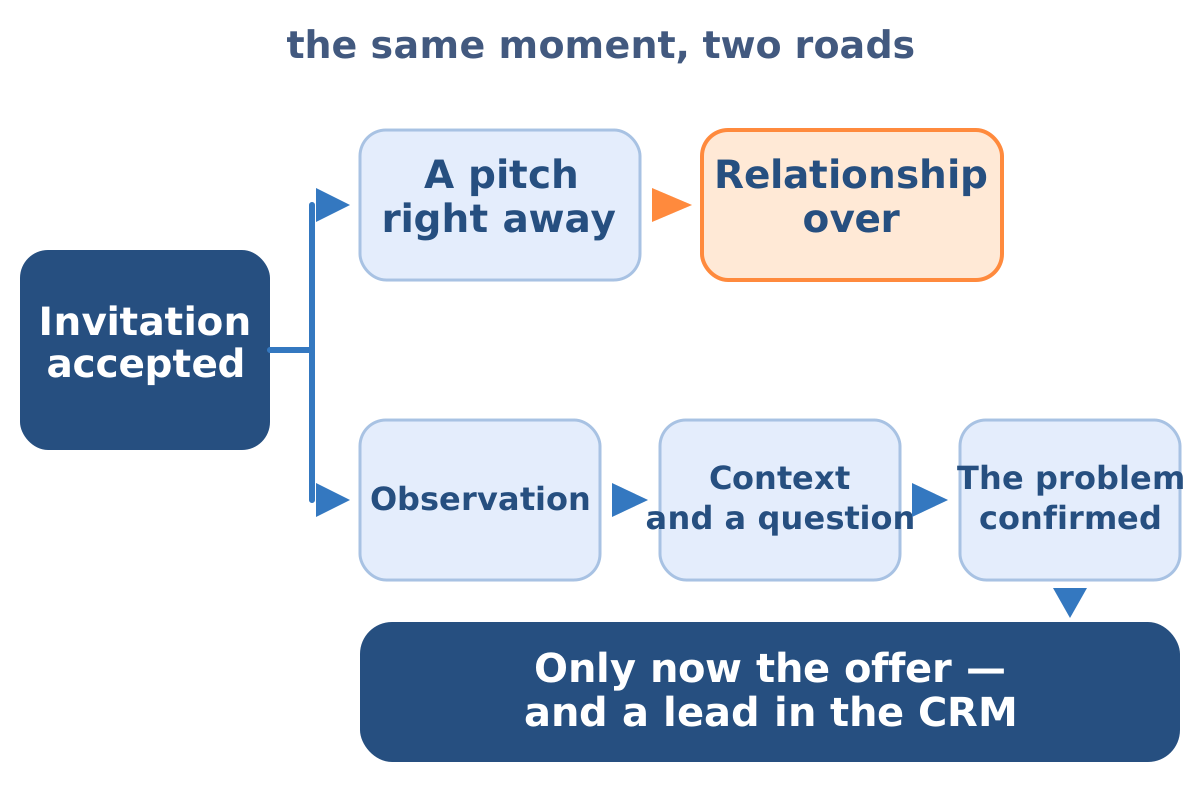
- Open a conversation rather than send an offer. The first message references the context and asks a question. The offer appears once the problem is confirmed, which is usually several exchanges later.
- Move the lead into the process. A contact with a confirmed need enters the CRM with its source recorded, exactly like any other lead, and qualification proceeds normally.
The channel pairs naturally with outbound email: a LinkedIn message and a Cold Email Lead Generation sequence form one reach-out sequence in which the channels reinforce rather than duplicate each other. This also matters because conversion rarely happens on first contact — directional, from the lab's practice, a new customer typically converts after around the fifth contact and sometimes as late as the twelfth (drySEO lab data).
It is worth naming what a successful outbound sequence actually produces. In practice, cold email and cold calling are run to book a meeting — a sales visit, a business breakfast, an invitation to an industry event (drySEO lab data, directional from practice rather than an export). A LinkedIn message works to the same logic: its measure is the conversation it opened, not a form nobody fills in here. So outbound is counted in meetings booked and meetings held; a cost per lead would describe it with a yardstick borrowed from an inbound channel.
What are LinkedIn Lead Gen Forms, and are they free?
Lead Gen Forms are a LinkedIn ad format that captures a contact inside the platform: instead of sending a click to a landing page, the ad opens a form pre-filled with the member's own profile data — name, work email, job title, company — which the person confirms in a couple of taps.
On the question of cost, the distinction that matters is between the format and the reach. The form itself carries no separate charge — it is a feature of an advertising campaign, so what you pay for is the media, exactly as with any other ad objective. The organic routes on LinkedIn, meaning the profile, posts, comments and messages, require no media spend at all. So “free” is true of the format and false of the traffic, and the honest way to compare the two is per lead rather than per format.
Three things Lead Gen Forms do well:
They remove friction
Pre-filled fields raise completion rates compared with a form the person has to type into on a phone.
They deliver clean data
The work email and job title come from a profile the member maintains, so records are more consistent than typed entries.
They target by professional attributes
Job title, seniority, company size and industry are available as targeting parameters rather than as inferences.
Two things they do poorly, which decide whether the route suits you at all. A pre-filled form takes very little intent to complete, so lead quality has to be checked rather than assumed — the ease that lifts the completion rate also lets people through who were barely paying attention. And the lead exists inside LinkedIn until something moves it: integrate the form with the CRM before the first campaign runs, and tag the source, or the leads will sit in an export nobody downloads. The integration is also what makes cost per lead computable at all.
What to offer inside the form decides the rest. An incentive matched to a real problem — a benchmark report, a calculator, an assessment — attracts people with that problem; a generic “contact us” attracts people who clicked by reflex.
How do you use LinkedIn Sales Navigator for lead generation?
As a filter and a signal source, not as a sending tool. Sales Navigator adds three things over the free account: much finer search filters, saved lead and account lists that update themselves, and alerts on events worth reacting to — a job change, a funding round, a growth signal, a prospect's post.
Those alerts are the real value, because timing decides reply rates more than copy does. A message sent the week someone takes over a function lands differently from the same message sent at random, and that is the difference between a tool that saves time and a tool that just costs money.
Whether it is worth paying for follows from one question: is your prospecting limited by finding the right people, or by the time to have conversations with the people you have already found? The first constraint is what Sales Navigator removes. The second it does not touch, and buying it to solve the second is the most common way the subscription is wasted.
What is the 3-2-1 rule on LinkedIn?
It is a posting and engagement heuristic that circulates in several different forms — most commonly as a weekly cadence splitting posts between educational, personal and promotional content, and sometimes as a ratio of engaging with others versus publishing your own material. The versions disagree about which number belongs to which activity, and none of them is published with a measurement behind it.
The structural claim underneath all the variants is sound and worth keeping: most of what you publish should serve the reader, a little should show who you are, and very little should sell. The specific split matters far less than the ratio being lopsided in the reader's favour.
The way to use a rule like this is the way the lab treats any ratio arriving without a denominator — as a hypothesis to test in your own account rather than a number to obey. Track which of your posts produce profile views, conversations and enquiries, and the right cadence for your audience will emerge from your own data within a quarter. A rule of thumb that survives that test has earned its place; one that does not was never measuring your audience anyway.
What is the Social Selling Index?
The Social Selling Index is a free LinkedIn score from 0 to 100 measuring activity on the platform across four areas: establishing a professional brand, finding the right people, engaging with insights, and building relationships. It is visible to every member for their own profile.
Read it with distance, because of what it measures: activity, not revenue. A high score means the platform sees you doing the things it rewards, which does improve how often your profile and posts surface. Whether that activity turns into conversations and enquiries is a separate question, and it is the one your CRM answers.
Used as a diagnostic, the four sub-scores are genuinely useful — a low score in one area points at the specific habit that is missing. Used as a target, the index becomes a vanity metric, because it can be raised substantially without a single additional lead.
Which metrics prove LinkedIn lead generation works?
Four, in the order the funnel produces them, and each one with a denominator stated:
Conversations started
replies that go beyond an acceptance, divided by people contacted. This is the honest top of an outreach funnel.
Meetings booked and held
divided by conversations started — the output outbound is actually run for.
Leads passed to the CRM with the source tagged “LinkedIn”
the only figure that connects the channel to the business.
Close rate on those leads
compared against leads from other sources with the same denominator.
Profile views and post reach
as leading indicators, useful for spotting a change early and useless as a report on their own.
The second condition for an honest reading is the measurement window. Since more than half of all closings fall after day 45, and the platform works as a confirmation point on a longer path, a monthly report shows only the fast slice of the set. The figure that says something here compares the close rate of leads with platform contact in their history against the close rate of the rest, on the same denominator.
Without source tagging in the CRM, LinkedIn is easy to call unmeasurable — which usually means only that nobody is recording where the conversation came from. That single field is the difference between a channel you can judge and a channel you argue about. The counting rules behind all of it, including why platform-side numbers and CRM numbers diverge, are set out in the lead generation metrics guide.
What are the most common LinkedIn lead generation mistakes?
Five, and the first two account for most of the damage:
- The pitch sent seconds after an invitation is accepted. A request for time with nothing offered in return, which ends the relationship before it starts.
- Templated outreach at volume. The same message to hundreds of people, recognisable as such within one line.
- Passivity. Having a profile generates nothing; the channel rewards systematic activity and forgets accounts that go quiet.
- Treating LinkedIn as a free mailing list for mass offers, which is how accounts get restricted.
- Automating the conversation rather than the admin. Automating follow-up reminders, CRM entry and list hygiene saves hours; automating the messages themselves removes the only thing that made the channel work.
Frequently asked questions about LinkedIn lead generation
Do you need a paid account to generate leads on LinkedIn?
Not at the start. Profile optimization, network building, publishing and messaging all work on a free account. A paid tier earns its place once prospecting reaches a scale where search filters and buying signals save meaningful time.
How much time per day does LinkedIn lead generation take?
Less than most people expect, but daily. Twenty to thirty minutes on comments, messages and reviewing prospect activity produces more than a three-hour burst once a week, because both the algorithm and human memory reward regularity.
How long before LinkedIn produces leads?
Months rather than weeks for the content and relationship routes, since authority accumulates before it converts. Paid Lead Gen Forms produce contacts in days — which is exactly why the two are worth running together rather than choosing between them.
Should you use LinkedIn or cold email?
Both, as one sequence. LinkedIn establishes that you are a real person with relevant expertise; email carries the detail and the follow-up. The channels reinforce each other, and the same CRM record should hold both threads.
Is LinkedIn automation safe?
Automating the platform's own interactions — connection requests, messages, profile visits — carries account risk and produces the templated contact that fails anyway. Automating the surrounding work is safe and effective: reminders, CRM entry, sequence timing, reporting.
How many connection requests can you send per day?
Fewer than the tools offer. The platform limits invitations and weighs acceptance rates, so a modest number of well-chosen, personalised requests outperforms a high volume that damages both the account and the acceptance rate it is judged on.